
Account
Login Partly built
The client logs in to your KoG account through your browser and then holds a device key pair. Nothing that could be replayed travels over the game connection, and nothing is sent in chat. This page describes what is built and what is not.
Source of truth: docs/LOGIN.md. The client treats the KoG account service at https://kog.tw as a black box that speaks OAuth 2.0 and OpenID Connect discovery and has two device endpoints. This page does not describe how that service works inside.
Switches #
| Setting | Default | Effect |
|---|---|---|
cl_kog_login | on in canary and dev builds, off in stable | Off: no browser flow and no automatic login. The /login <code> chat command keeps working. |
cl_kog_auto_login | off | Prove this device to servers when joining. Has no effect until the join protocol exists (see below). |
cl_kog_account_url | https://kog.tw | Base URL of the account service, for staging. https only. |
cl_kog_account_extra_origins | empty | Origins besides the account URL's own and *.kog.tw that its login description may name, https://host[:port] separated by spaces. |
cl_kog_device_name | empty | Name of this device on your account, at most 40 characters. Empty means KoG Client (macOS), (Windows) or (Linux): the host name is never sent unless you type it. |
cl_kog_account_name | empty | The account name shown in the settings. Not a secret. |
The flow #

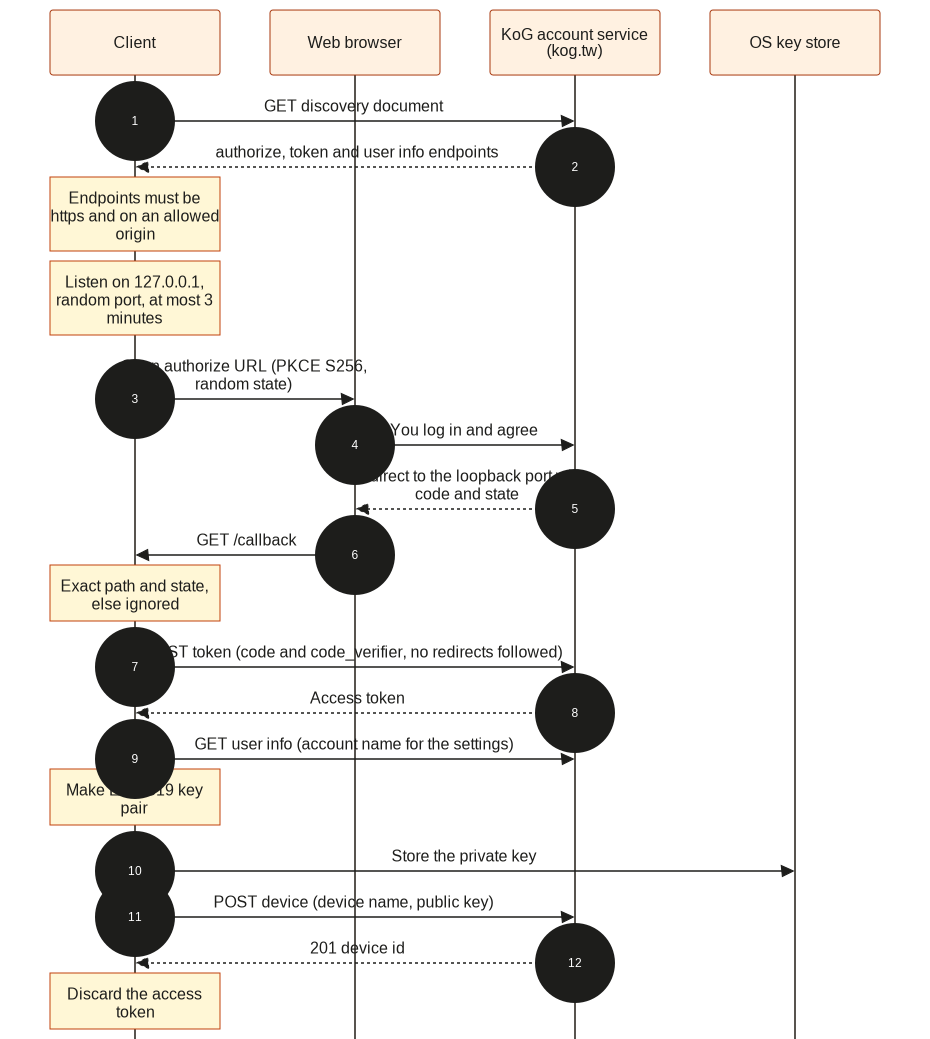
Diagram source as text (Mermaid)
sequenceDiagram
  autonumber
  participant C as Client
  participant B as Web browser
  participant A as KoG account service (kog.tw)
  participant K as OS key store
  C->>A: GET discovery document
  A-->>C: authorize, token and user info endpoints
  Note over C: Endpoints must be https and on an allowed origin
  Note over C: Listen on 127.0.0.1, random port, at most 3 minutes
  C->>B: Open authorize URL (PKCE S256, random state)
  B->>A: You log in and agree
  A-->>B: Redirect to the loopback port with code and state
  B->>C: GET /callback
  Note over C: Exact path and state, else ignored
  C->>A: POST token (code and code_verifier, no redirects followed)
  A-->>C: Access token
  C->>A: GET user info (account name for the settings)
  Note over C: Make Ed25519 key pair
  C->>K: Store the private key
  C->>A: POST device (device name, public key)
  A-->>C: 201 device id
Note over C: Discard the access token- The client reads the discovery document of the account service (
/.well-known/openid-configurationbelowcl_kog_account_url) and checks its endpoints (see which hosts). - It listens on a random port on the loopback address (
127.0.0.1or[::1]), for at most 3 minutes, and opens the authorize URL in your system browser, with a PKCE challenge (S256), a randomstateand the device name. The password is typed in the browser, never in the game. - You log in and agree. The browser is redirected to
/callbackon the loopback port. The client accepts only the exact path and the rightstate, answers "You can close this tab" and closes the listener. - The client exchanges the code and the PKCE verifier for an access token, reads the account name for the settings, makes an Ed25519 key pair and registers the public half and the device name (
POST /api/client/device, answered with201and a device id). - The private key goes into the key store. The access token is discarded.
Which hosts the login talks to #
The discovery document is only a hint where the account service lives, so its three endpoints (authorize, token, user info) are checked before anything is sent to them. An endpoint must be https and have
- the same origin (scheme, host and port) as
cl_kog_account_url, or - a host that ends in
.kog.tw, on https and the default port, or - an origin listed in
cl_kog_account_extra_origins, for a staging setup.
Everything else (another domain, kog.tw.evil.example, kog.tw@evil.example, another port, plain http) makes the login fail with "unusable login description" before the browser is opened. The device calls go to cl_kog_account_url only. The token, user info, device and removal requests do not follow redirects: a 307 or 308 would send the code and the verifier again to a place you never chose. There is no certificate pinning; TLS is verified normally.
The device key #
| System | Where the private key lives |
|---|---|
| macOS | Keychain, item accessible WhenUnlockedThisDeviceOnly: not in backups, not synced. |
| Windows | Credential Manager, CRED_PERSIST_LOCAL_MACHINE: it survives log-off, stays on this PC and is readable by this Windows user only. |
| Linux and others | A file kog_device.key with mode 0600 in the save directory, written as a new temporary file (O_EXCL, O_NOFOLLOW), synced and renamed over the old one, so a link planted at either name is never followed. libsecret is not used: it is a heavy dependency. |
A process running as the same user can still ask the keychain or read the file. This is the same protection as an SSH key. The key is never in the config, logs, screenshots or crash reports, and memory buffers are wiped after use.
What is sent where #
Nothing leaves your computer except requests to the account service (kog.tw by default): the discovery document, the token exchange, user info, device registration and removal. For registration the client sends the OAuth code and the PKCE verifier, the device name and the public half of the device key. The private key, the password and the access token never go anywhere else. The browser link is logged by host only, never with its query, and requests are not logged.
Log out and revocation #
Log out on this device wipes the private key at once. The account service only accepts the removal of a device with a token, so the client runs the browser step again and sends DELETE /api/client/device/{id}. If that is cancelled or fails, the key is gone anyway and the device stays listed on kog.tw until you remove it there. Only 200 and 204 count as removed; a 404 means the browser was signed in to a different account than the one that owns the device, and the client says so instead of claiming success.
If your computer is stolen, remove the device on kog.tw. After that, the device is no longer listed on your account.
Threats considered #
| Threat | What happens |
|---|---|
| Someone captures game traffic | No password, key or token travels in chat or on the game connection. |
| Another local process on the loopback port | The port is random per login, open for at most 3 minutes, on loopback only (and exclusive on Windows). Up to 4 connections are served at once and each has 5 seconds to send its request line. The first request with the exact path and the right state wins; others are answered with an error. A process that wins the race learns only an authorization code that is useless without the PKCE verifier, which never leaves the client's memory. A forged callback cannot match the 192-bit random state. |
| Another local process reads the key | See the device key: same user can, other users cannot. |
| The access token leaks | It is held only in memory, wiped together with the code, the verifier and the request copies, and never written to disk. |
| A fake account service | TLS is verified, the discovery document is accepted only from the configured https base URL, and its endpoints must be on an allowed origin. |
Join proof Planned #
The client can already sign a challenge with the device key: the signing code binds the server address, a nonce, the device id and a session id, each length-prefixed, so a challenge cannot be reused on another server, with another nonce, by another device or in another session. The decision whether to answer at all is in the client: only if cl_kog_login and cl_kog_auto_login are on, a key exists, the server is listed for the kog community in the server list (which a server cannot claim for itself), you did not already use /login in this join, and at most once per join. Other servers never get an answer.
The wire format that would carry the challenge is not decided and not built. The transport in the client is a stub that sends nothing, which is why cl_kog_auto_login is off. Today, nothing of this reaches any server.

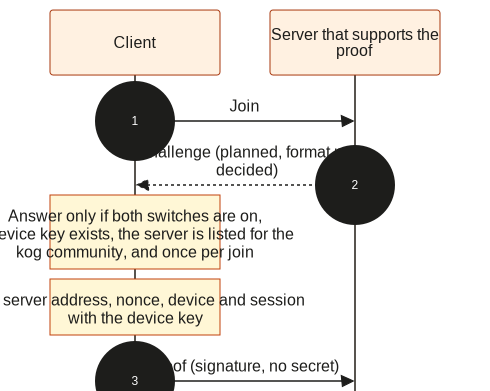
Diagram source as text (Mermaid)
sequenceDiagram
  autonumber
  participant C as Client
  participant S as Server that supports the proof
  C->>S: Join
  S-->>C: Challenge (planned, format not decided)
  Note over C: Answer only if both switches are on,<br/>a device key exists, the server is listed for the<br/>kog community, and once per join
  Note over C: Sign server address, nonce, device and session<br/>with the device key
  C->>S: Proof (signature, no secret)
Tests #
src/test/kog_login_test.cpp covers the RFC 7636 PKCE vector, the RFC 8032 Ed25519 vectors, callback parsing, the listener, the allowed endpoint origins, the challenge bytes and signature, the neutral device name, the wiping of request bodies and a 307 that the token request must not follow. Not tested automatically: the HTTP steps of the flow, the key store, the key file and the settings box, which need a running account service or a desktop session.