
Updates and trust
Release signing Partly built
A release only reaches players after public checks and a signature the client can verify itself. Canary and dev are signed by a CI key. Stable, which does not exist yet, will need a second signature from a hardware key as well.
The two-signature model #

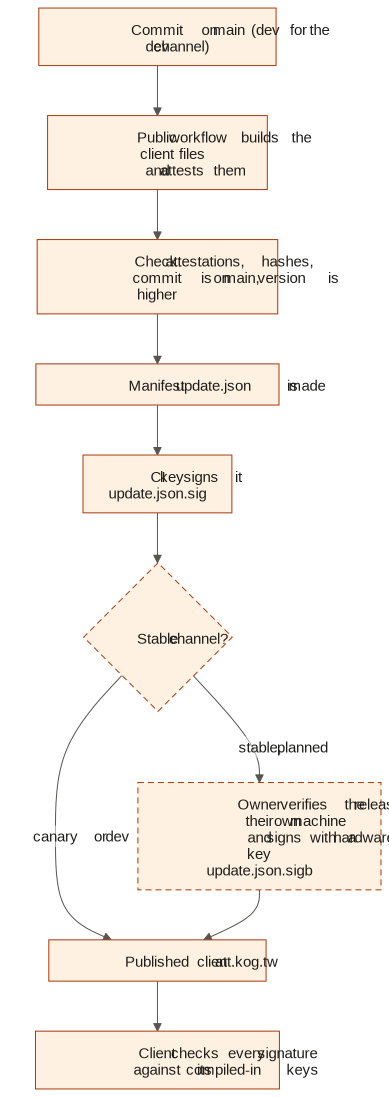
Diagram source as text (Mermaid)
flowchart TB
  A["Commit on main (dev for the dev channel)"] --> B["Public workflow builds the client files<br/>and attests them"]
  B --> C["Check: attestations, hashes,<br/>commit is on main, version is higher"]
  C --> D["Manifest update.json is made"]
  D --> E["CI key signs it<br/>update.json.sig"]
  E --> S{"Stable channel?"}
  S -->|"canary or dev"| P["Published at client.kog.tw"]
  S -->|"stable, planned"| H["Owner verifies the release on their own machine<br/>and signs with a hardware key<br/>update.json.sigb"]
  H --> P
  P --> V["Client checks every signature<br/>against its compiled-in keys"]
  classDef planned stroke-dasharray:6 4
class S,H planned| Channel | Signatures the client requires | State |
|---|---|---|
canary | One: the channel's CI key (update.json.sig) | Built published |
dev | One: the channel's CI key | Built nothing published yet |
stable | Two: a CI key (A) and the owner's hardware key (B, update.json.sigb) | Planned keys are placeholders, no release |
Because the client requires both signatures for stable, neither a stolen GitHub account nor a stolen CI secret alone can publish a stable update: the second signature is made on a hardware security key, after the owner verified the release on their own machine and touched the key.
What happens to a release #
Canary and dev #
- A public workflow builds the client files from
main(canary) ordev(dev). It never builds for forks or pull requests. It attests the files (GitHub build provenance) and makes a draft manifest. - A check job without secrets verifies the attestations, the hashes and that the commit is on
main, and makes the manifest. - A separate job signs only that manifest with the channel's CI key.
- The signed manifest is published to the branch
published, which is what client.kog.tw serves. The commit message holds the manifest SHA-256, the source commit and a link to the run.
Stable Planned #
- The owner pushes a signed version tag. The release workflow refuses unless the tag's commit is the head of
main, the required checks passed and the version matches the client's version. It builds the client only (no server, no tools), fails if a server is inside a package, attests the files and makes an immutable prerelease. - The verify step checks every asset with
gh attestation verifyagainst the release workflow and the tag, checks the hashes, that the release is immutable, that the version is higher than the published one and that the commit is onmain. - The owner runs a script that verifies the release again on their own machine, rebuilds the manifest and compares it byte for byte with CI's, prints a summary, asks for the version, and signs with the hardware key.
- Publishing happens only with both signatures, checked against the pinned public keys.
The public scripts are in scripts/kog/ of the client repository (verify_release.sh, approve_release.sh, publish_signed.sh, verify_published.sh). The stable path has not been run for a real release.
Rollback protection #
Rollback means making clients install an older, known-bad version. The client defends against it in four ways, all checked locally after the signature: the sequence must rise per channel; the manifest has an expiry (14, 30 or 90 days by channel), so an old manifest stops working and a freeze ends; a version older than the installed one is applied only after you confirmed a channel switch; and a version the client rolled back from is remembered and not tried again. Details: update channel.
Emergency stop #
For stable there is a script that signs a copy of the current manifest with halted: true and a higher sequence, using the hardware key and the offline backup CI key, and publishes it without waiting for CI. A client that sees it does not update. A halt withdraws an update from clients that have not applied it; it does not remove a version already installed.
Keys #
| Key | Held by | Where the client has it |
|---|---|---|
| CI keys a and b, per channel (6 keys) | Automation. The private halves are never in the client. | KOG_<CHANNEL>_CI_KEYS in kog_update_pubkey.h |
| Owner hardware keys (stable, signature B) | The owner's security keys, never exported | KOG_STABLE_OWNER_KEYS (empty today) |
| Offline backup CI key (stable) | The owner, offline | KOG_STABLE_BACKUP_CI_KEYS (empty today) |
Rotation of the CI keys is described on the update channel page. After a loss of the CI keys, the backup key still signs together with the hardware key, and a client release replaces the CI keys.
Known weak points #
- The CI private keys are held by automation. Anyone who could change that automation and read the keys could sign a canary or dev manifest. For stable that is not enough, because signature B is needed. For canary and dev, the people exposed are the testers who opted in.
- With one maintainer, the person who approves a signing run can approve their own run. A second maintainer should replace that.
- A release of a data file reuses the hash of an earlier verified release; the earlier verification is trusted.
- The workflows have had little time in production. They were checked with actionlint and shellcheck. Hardware-key signatures were checked with a software emulation of the format against OpenSSH, not with a real security key.
The client's full threat table is on the security page.